


Note: This article only applies to cases where you want to disable/enable the welcome panel for a specific existing account. In case you wish to disable the welcome panel server-wide, for all newly-created accounts, then you should refer to this article instead:
How to Disable the Welcome Panel Server-Wide for Newly Created Accounts
In cPanel & WHM version 94, we added the Welcome panel to the cPanel interface. The Welcome panel is only displayed to new user accounts. The Welcome panel displays common features that new users often access. Here is the panel: 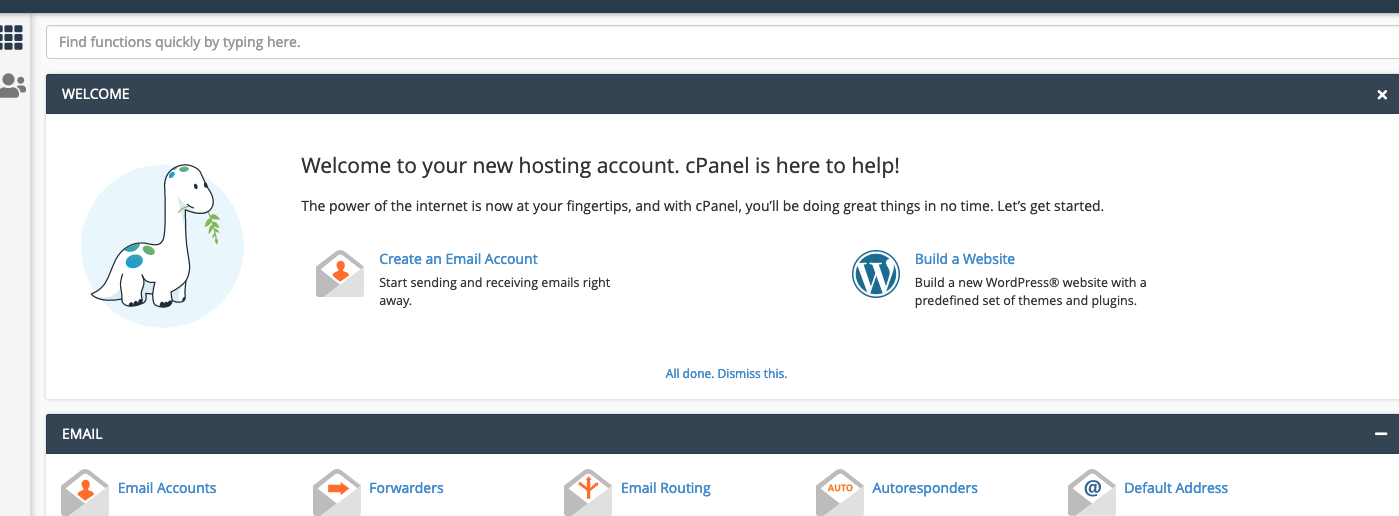
So the welcome panel is shown to every new account. If the button "All done. Dismiss this." shown above is clicked then the welcome page will disappear. After this if you look at the user's home account you will see this file being created:
/home/$USERANAME/.cpanel/nvdata/xmainwelcomedismissed
If you wish, you can modify the behavior of the welcome panel by modifying this file. The below API calls will disable and enable the welcome panel by modifying the content of the above-mentioned file. You will need to set the USERNAME variable for the single user commands.
Disable for one user:
USERNAME="";echo '{"personalization": {"xmainwelcomedismissed": 1} }' | uapi --user=$USERNAME --input=json Personalization set
Enable for one user:
USERNAME="";echo '{"personalization": {"xmainwelcomedismissed": 0} }' | uapi --user=$USERNAME --input=json Personalization set
Disable fore all users:
find /var/cpanel/users -type f | cut -d"/" -f5 | while read USERNAME;do echo '{"personalization": {"xmainwelcomedismissed": 1} }' | uapi --user=$USERNAME --input=json Personalization set; done
Enable for all users:
find /var/cpanel/users -type f | cut -d"/" -f5 | while read USERNAME;do echo '{"personalization": {"xmainwelcomedismissed": 0} }' | uapi --user=$USERNAME --input=json Personalization set; done
